xdotool and wmctrl on Wayland
On X11, wmctrl -r Firefox -e 0,0,0,960,1080 or xdotool search --name Firefox windowmove 0 0 moves a window. In a Wayland session on Ubuntu, Fedora or Kubuntu, the same commands find almost nothing: only the X11 apps that run in XWayland. This page explains why, and how to list, tile, focus and close every window by script on GNOME and KDE Plasma under Wayland with SMBAct.
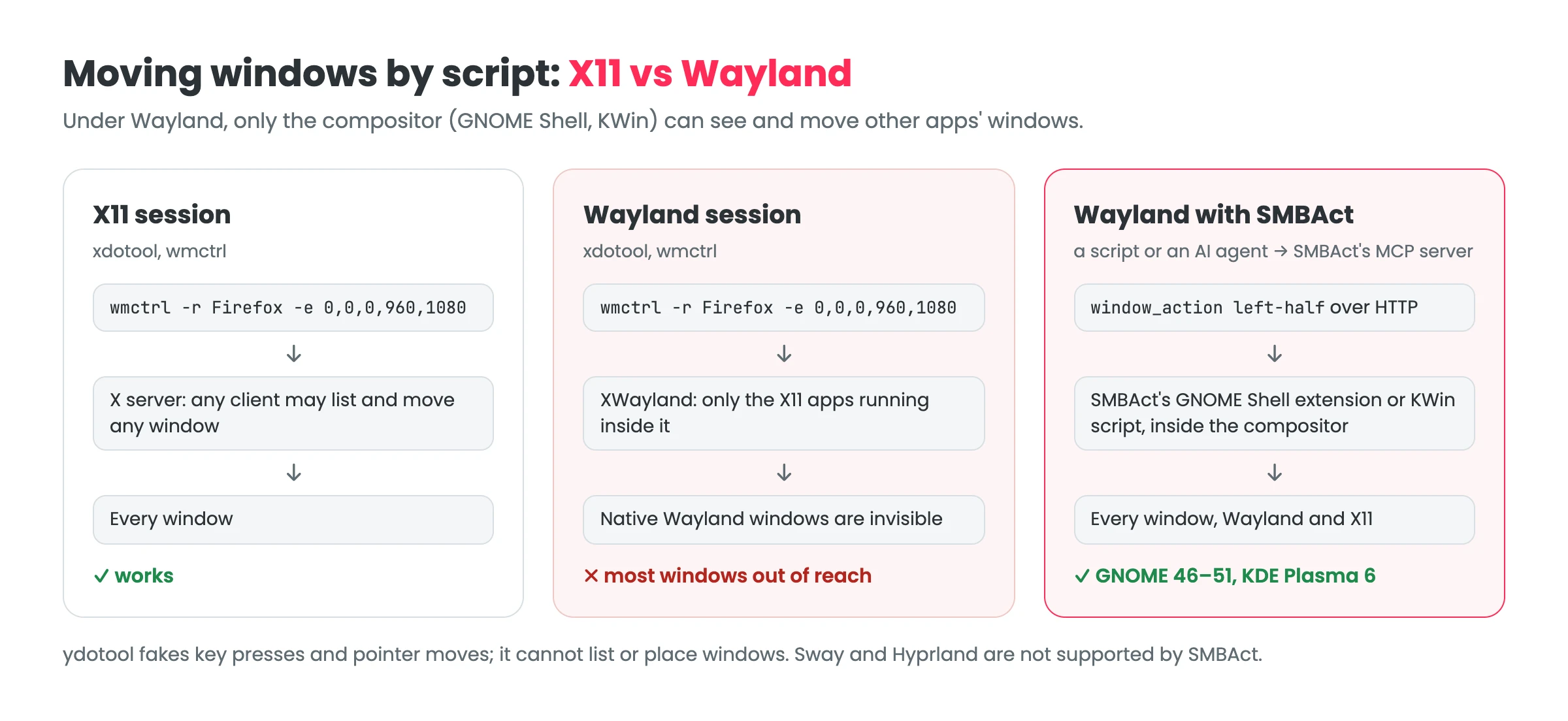
Why xdotool and wmctrl stop working
X11 lets any program list every window and ask for it to be moved; wmctrl and xdotool are built on that. Wayland removed it on purpose: an app sees only its own windows, and only the compositor (GNOME Shell, KWin) knows where the others are. On Wayland, xdotool and wmctrl talk to XWayland, the X server for old X11 apps, so they see those apps and nothing else. Firefox, GNOME Text Editor, Kate, Dolphin and most other native apps are out of reach.
What does not help:
- ydotool simulates key presses and pointer movement through the kernel input layer. It cannot list windows or set their position and size.
- Forcing apps into XWayland (for example
GDK_BACKEND=x11) makes them visible towmctrlagain, but only those apps, and they lose native Wayland scaling.
What does help is code that runs inside the compositor: a KWin script on KDE Plasma (the community tool kdotool works this way), or a GNOME Shell extension on GNOME.
How SMBAct does it
SMBAct is a window manager and switcher for Windows, macOS and Linux. On Wayland it ships its own compositor plugins, so it sees and moves every window, Wayland and X11 alike:
- GNOME (GNOME 46–51, for example Ubuntu 25.10 and 26.04): the SMBAct GNOME Shell extension, installed from the app with one log-out. Guide.
- KDE Plasma 6: a KWin script SMBAct loads by itself, nothing to install. Guide.
Both are open source: GigLaboCom/smbact-shell. With them, SMBAct’s hotkeys, switcher and actions popup work on every window, and so does its local MCP server, which is what a script talks to.
Move windows by script on Wayland
SMBAct’s MCP server listens on 127.0.0.1. Turn it on under MCP server in SMBAct’s sidebar and copy the access token. Each request is one HTTP POST with a JSON-RPC body; there is no session to open, so curl is enough:
TOKEN=...   # from SMBAct › MCP server; keep it out of your shell history and repos
smbact() {
  curl -s http://127.0.0.1:5057/mcp \
    -H 'Content-Type: application/json' -H "Authorization: Bearer $TOKEN" \
    -d "{\"jsonrpc\":\"2.0\",\"id\":1,\"method\":\"tools/call\",\"params\":{\"name\":\"$1\",\"arguments\":$2}}"
}

smbact list_windows '{"app": "firefox"}'                                   # ids, titles, frames
smbact window_action '{"window_id": "<id from list_windows>", "action": "left-half"}'
smbact focus_window '{"window_id": "<id>"}'
On Linux the app filter matches the window’s app id or WM_CLASS, for example firefox, org.gnome.TextEditor or kate. The same calls are what an AI agent such as Claude Code or Cursor makes when you ask it to arrange your windows: see SMBAct for AI agents.
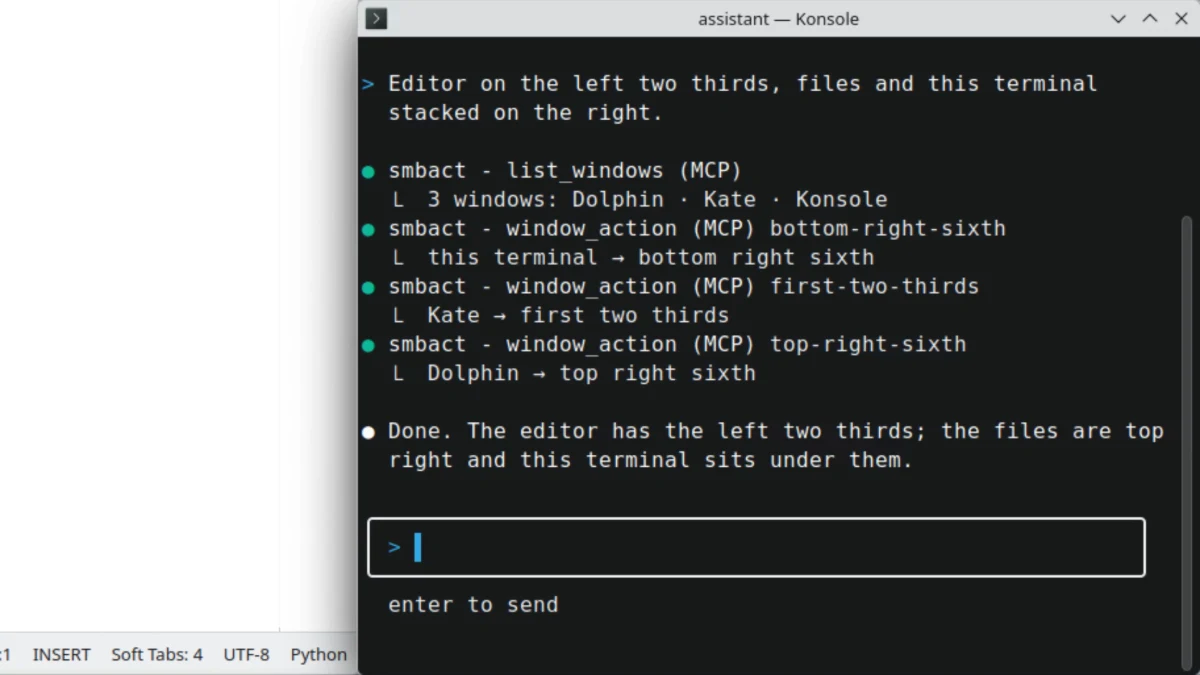
Three native Wayland windows (Kate, Dolphin, Konsole) arranged through SMBAct’s MCP server on KDE Plasma 6.
wmctrl and xdotool commands, translated
| On X11 | With SMBAct on Wayland |
|---|---|
wmctrl -l, xdotool search --name … | list_windows (filter by app or title) |
wmctrl -a <win>, xdotool windowactivate | focus_window |
wmctrl -r <win> -b add,maximized_vert,maximized_horz | window_action with maximize (also maximize-height, fullscreen, restore) |
xdotool windowminimize | window_action with minimize; all windows: minimize_all |
wmctrl -c <win> | close_window (off by default; SMBAct asks you before closing) |
| A script that moves a window to the other monitor | window_action with next-display or previous-display |
A tiling script with xrandr maths | window_action with one of the layouts: halves, thirds, fourths, quarters, sixths, eighths, center |
wmctrl -r <win> -e 0,x,y,w,h, xdotool windowmove / windowsize | Exact frames with set_window_frame and grids with place_windows come with the next SMBAct update; today use the named layouts |
xdotool key, xdotool type | Not covered: SMBAct arranges windows, it does not type |
list_windows returns each window’s id, app, title, frame and display. Coordinates on GNOME and KDE Wayland are the compositor’s logical pixels, top-left origin.
Good to know
- License: MCP tool calls work during SMBAct’s 14-day trial and with a license (a one-time purchase from €14.99). Without either, the server answers but refuses tool calls.
- No command-line client on Linux yet:
smbact-cliships inside the macOS build; for Linux and Windows it is on the roadmap. Until then, scripts use HTTP as above. - Hotkeys instead of scripts: for moving the focused window, SMBAct’s hotkeys do the same without any script, under Wayland too. For example, Ctrl + Super + Alt + → sends it to the next monitor.
- Not supported: Sway, Hyprland and other wlroots compositors. There SMBAct reaches only XWayland windows.
FAQ
Does xdotool work on Wayland?
Only for X11 apps running in XWayland. Wayland does not let a program list or move other programs’ windows, so xdotool and wmctrl cannot see native Wayland windows on GNOME or KDE Plasma.
What can I use instead of wmctrl on Wayland? A tool that runs inside the compositor. On KDE Plasma, KWin scripts (kdotool uses them); on GNOME, a GNOME Shell extension. SMBAct ships both and exposes them to scripts and AI agents through its local MCP server.
Can ydotool move windows? No. ydotool simulates key presses and pointer movement through the kernel input layer. It cannot list windows or set their position and size.
Does SMBAct work on Sway or Hyprland? No. SMBAct supports X11 sessions and GNOME and KDE Plasma on Wayland. On other Wayland compositors it reaches only XWayland windows.
Other guides
- SMBAct on Ubuntu GNOME (Wayland) · SMBAct on KDE Plasma (Wayland)
- SMBAct MCP server: turn it on, the tools, the guard rails.
- Move a window to another monitor · Download SMBAct
