SMBAct MCP server
SMBAct has a Model Context Protocol server built in. With it, AI assistants on your computer (Claude Code, Codex, Cursor, VS Code, Claude Desktop and any other MCP client) can list your windows and displays, put windows into SMBAct’s layouts, move them to another monitor, bring them to the front, minimize them and, if you allow it, close them.
It runs inside SMBAct, only while SMBAct is running, and listens on 127.0.0.1 only. It is off until you turn it on. For agents that read Agent Skills, our free skills add the know-how on top: what to check first, what never to touch, and how to report.
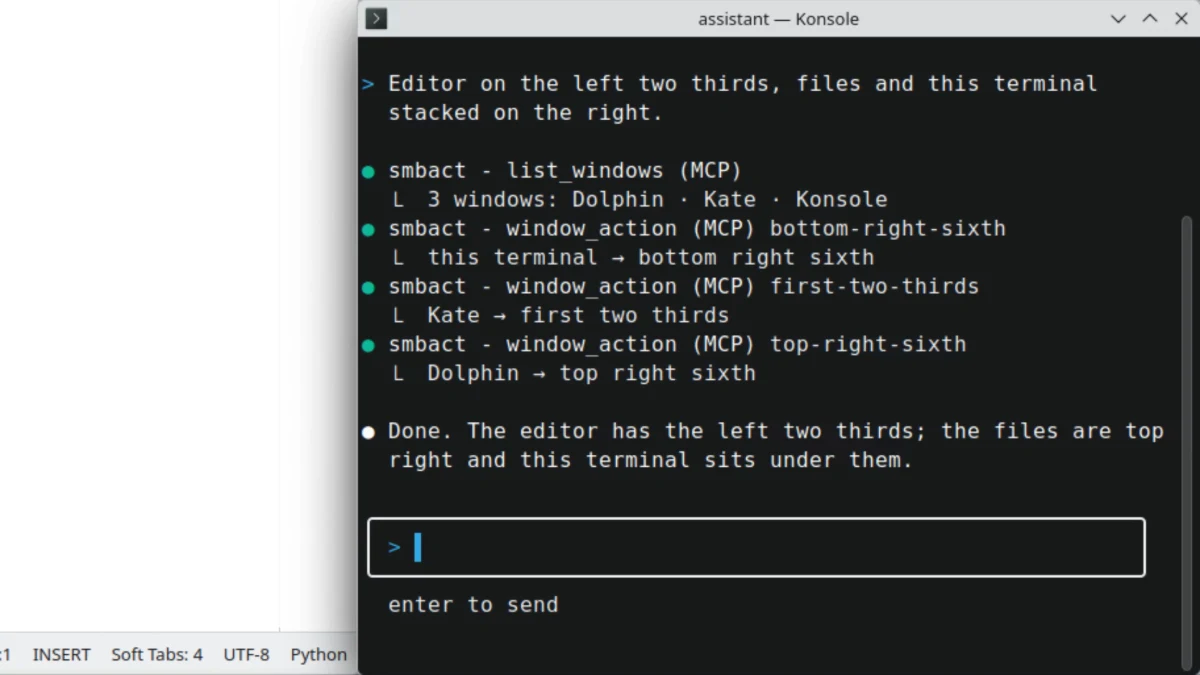
Each line is a real tool call to SMBAct: one list_windows, then one window_action per window. Recorded on KDE Plasma 6 (Wayland).
Turn it on
- In SMBAct, open MCP server in the sidebar.
- Turn on Enable the MCP server. The status line shows Running: with the address,
http://127.0.0.1:5057/mcpby default. To use another port, type it under Port and press Apply. - Under Access, leave Require an access token on (recommended: without a token any program on this computer can call the tools). Show or Copy the token. Regenerate… makes a new one; clients set up with the old token stop working until you give them the new one.
- Under Tools, choose what clients may change.
list_windowsandlist_displaysare always available; the switches are Arrange windows, Focus windows, Minimize all and Close windows. With Ask me before closing anything on, SMBAct asks you each time a client wants to close something. - Under Connect a client, copy the snippet for your client. Recent calls at the bottom of the page lists what clients asked for and how long each call took.
MCP tool calls need an active license or a running trial. Clients can connect without one, but every tool call is refused until then.
Connect a client
<token> is the access token from the MCP server page. On macOS, <cli> is /Applications/SMBAct.app/Contents/Resources/bin/smbact-cli. SMBAct’s own Connect a client section shows the same snippets with your port and token filled in.
Claude Code
Over HTTP (any OS); add --scope user to use it in every project:
claude mcp add --transport http smbact http://127.0.0.1:5057/mcp --header "Authorization: Bearer <token>"
On macOS, as a local stdio server without port or token:
claude mcp add smbact -- <cli> mcp serve
Cursor, VS Code and other .mcp.json clients
{"mcpServers": {"smbact": {"type": "http", "url": "http://127.0.0.1:5057/mcp", "headers": {"Authorization": "Bearer <token>"}}}}
On macOS over stdio: {"mcpServers": {"smbact": {"command": "<cli>", "args": ["mcp", "serve"]}}}.
OpenAI Codex
In ~/.codex/config.toml (macOS, stdio):
[mcp_servers.smbact]
command = "<cli>"
args = ["mcp", "serve"]
Claude Desktop
Settings › Developer › Edit Config (claude_desktop_config.json), then restart Claude Desktop. Over HTTP it goes through mcp-remote, which needs Node.js:
{"mcpServers": {"smbact": {"command": "npx", "args": ["-y", "mcp-remote", "http://127.0.0.1:5057/mcp", "--header", "Authorization:${SMBACT_AUTH}"], "env": {"SMBACT_AUTH": "Bearer <token>"}}}}
On macOS, stdio works without Node.js: {"mcpServers": {"smbact": {"command": "<cli>", "args": ["mcp", "serve"]}}}.
The Claude Code plugin connects the server for you on macOS, together with the skills.
On macOS, Windows and Linux
- macOS MCP server (Apple Silicon, Intel):
smbact-cliships inside SMBAct and serves the same tools over stdio, with no port and no token; HTTP works too. In a terminal,smbact-cli mcp status,config,tokenandsnippetsshow and change the server settings. SMBAct needs the Accessibility permission (install guide). - Windows MCP server (x64): clients such as Claude Code, Claude Desktop, Cursor and Codex connect over HTTP to
127.0.0.1:5057with the token. SMBAct listens on loopback only, so Windows Firewall has nothing to ask (install guide). - Linux MCP server (x64): HTTP with the token, on X11 and on GNOME and KDE Plasma Wayland sessions. On Wayland SMBAct sees and moves every window through its GNOME Shell extension or KWin script, which
wmctrlandxdotoolcannot do there.
smbact-cli for Windows and Linux is on the roadmap; until then, use the HTTP connection there. It offers the same tools.
Tools
SMBAct 2.0.0 has six tools. The next SMBAct update adds eight more, for exact placement, macOS desktops and version checks.
| Tool | What it does | In 2.0.0 |
|---|---|---|
list_windows | Open windows: id, app, title, frame, display, minimized / maximized / fullscreen, active; filter by app or title. SMBAct’s own windows are left out | ✓ |
list_displays | Displays: index, name, main, frame, visible frame (without menu bar, Dock or taskbar), scale | ✓ |
window_action | One of 46 SMBAct actions, as its hotkey would do it: halves, thirds, fourths, quarters, sixths, eighths, center, move to an edge, maximize, maximize height, fullscreen, minimize, restore, next or previous display | ✓ |
focus_window | Un-minimizes a window if needed and brings it to the front | ✓ |
minimize_all | Minimizes the windows of all displays, the active one or the main one (excluded apps are skipped) | ✓ |
close_window | Closes a window, or every window of its application, like the close button (apps may ask to save). Off by default | ✓ |
place_windows, set_window_frame | One to 32 windows at exact sizes: pixels, percent, fractions, anchors, grids, gaps, a dry run, a result per window | next update |
move_window_to_display, get_window | Send a window to a named monitor; read one window | next update |
list_desktops, move_window_to_desktop | macOS desktops (Spaces): list them, send a window to another one | next update |
get_capabilities, get_version | What this SMBAct supports, and its version; answer without a license | next update |
A window is addressed by the id list_windows returns, or by "active" for the frontmost window. The frontmost window is usually the agent’s own terminal, so a client should list first. Errors come back as tool results with a code such as license_required, tool_unavailable or window_not_found.
Built-in guard rails
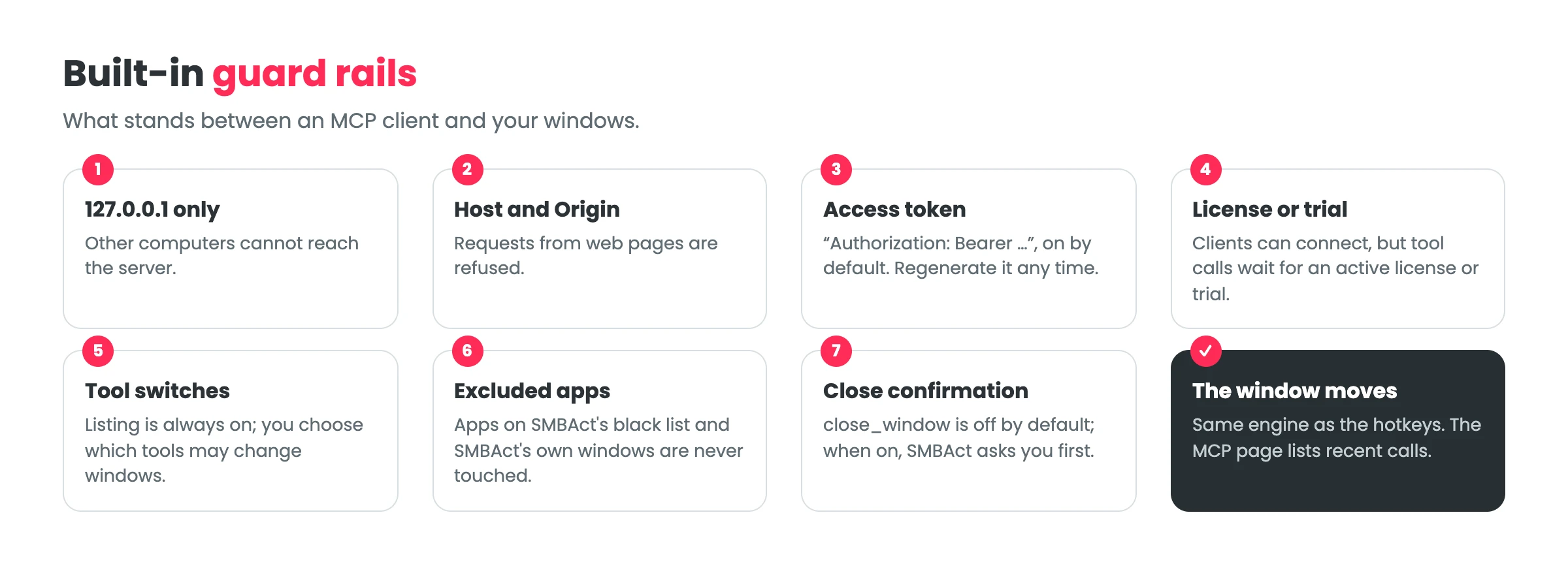
- Local only. The server listens on
127.0.0.1: other computers cannot reach it, and requests from web pages are refused. - Token. Clients send
Authorization: Bearer <token>. The snippets on the page hide the token; Copy copies the full text. - Your switches. Listing is always allowed; arranging, focusing, minimizing and closing are separate switches. Closing is off by default and, when on, SMBAct asks you first. The dialog names the window, or says that all windows of the application would close.
- Excluded apps. An app excluded on SMBAct’s Running Applications page is out of reach for SMBAct’s hotkeys, the actions popup and MCP clients alike.
See it on every platform
The same kind of request on Windows 10 and KDE Plasma 6 (Wayland). Every row in the client is a real tool call to SMBAct.
Windows 10: a scripted MCP client in a console moves the terminal, Notepad++, Chrome and Explorer.
KDE Plasma on Wayland: Kate to the first two thirds, Dolphin top right, the terminal under it. The macOS run is on the AI agents page.
FAQ
Is the SMBAct MCP server free? It is part of SMBAct. Tool calls work during the 14-day trial and with a license (a one-time purchase from €14.99). Without either, clients can connect but tool calls are refused.
Does it work on Windows and Linux?
Yes. On Windows and Linux clients connect over HTTP to 127.0.0.1:5057 with an access token. On macOS they can also use smbact-cli mcp serve over stdio, without a port or token.
Does it work on Wayland?
Yes, on GNOME and KDE Plasma Wayland sessions, where wmctrl and xdotool cannot move windows. SMBAct sees and moves every window through its GNOME Shell extension or KWin script.
Can the agent click buttons or type into apps? No. The MCP server arranges windows: it lists, moves, resizes, focuses, minimizes and closes them. It does not launch apps, type, or read window content.
Can other computers or web pages use the server?
No. It listens on 127.0.0.1 only, refuses requests from web pages, and asks for an access token by default.
Read next
- SMBAct agent skills: make Claude Code, Codex, Cursor or Copilot use these tools carefully.
- SMBAct for AI agents: the overview, and which piece you need.
- Download SMBAct · Documentation
