SMBAct for AI agents
Tell your AI agent “editor on the left two thirds, terminal on the right” and the windows move. SMBAct, the window manager for macOS, Windows and Linux, gives AI agents two things:
- A local MCP server built into the app. Any MCP client (Claude Code, Codex, Cursor, VS Code, Claude Desktop…) can list your windows and arrange them with SMBAct’s layouts.
- Agent skills, free and open source on GitHub. They teach the agent how to use that server well: look before it moves anything, leave its own terminal alone, ask before closing, and report what really happened.
A real run on macOS: the MCP client asks for the slides on the left two thirds, the film top right and its own terminal under it. SMBAct answers one list_windows call and three window_action calls. The same request on Windows and KDE Plasma.
How it fits together
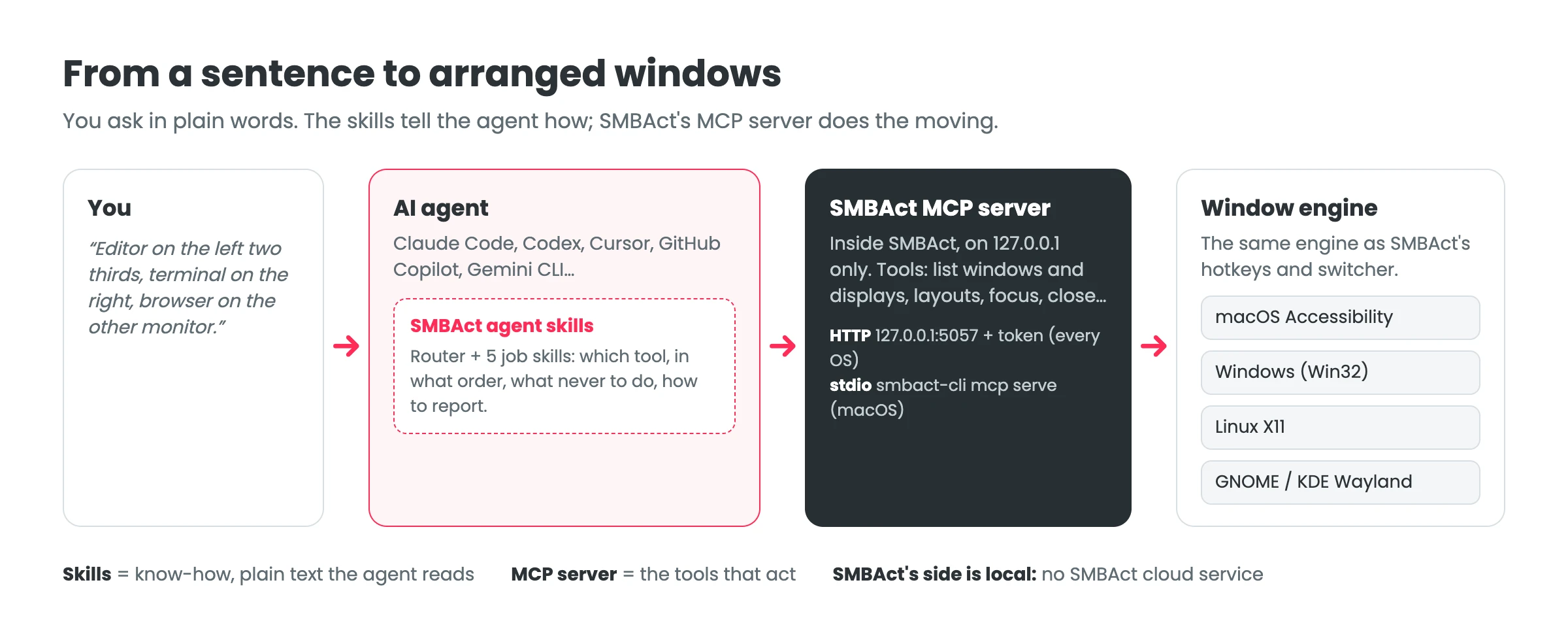
The agent (and the AI model behind it) decides what to do. The skills are plain text it reads first. The MCP server runs inside SMBAct on your computer and does the moving with the same engine as SMBAct’s hotkeys, switcher and command line. SMBAct sends nothing to a cloud service of its own.
MCP server or agent skills: which do I need?
| MCP server | Agent skills | |
|---|---|---|
| What it is | Tools: list_windows, window_action, focus_window… | Instructions: which tool, in what order, what never to do |
| Where it lives | Inside SMBAct (MCP server page in the sidebar) | A Claude Code plugin or a skills folder, from GitHub |
| Works alone | Yes, with any MCP client or a script | No: the skills act through the MCP server |
| Cost | Included in SMBAct (trial or license) | Free, MIT license |
- You use Claude Code, Codex, Cursor, GitHub Copilot or Gemini CLI: turn on the MCP server and add the skills. The server makes window management possible; the skills make the agent careful and predictable with it.
- You use another MCP client, or write your own script: the MCP server is enough. Its tool descriptions say what each tool does.
- You only want hotkeys: you need neither. Both are optional, and the MCP server is off until you turn it on.
What you can ask
- “Put Chrome on the left half and Slack on the right.”
- “Send the terminal to the other monitor.” “Bring the browser to the front.”
- “Minimize everything.” (only when you say so)
- “Why doesn’t my client see SMBAct?” (the skills run a read-only check)
With the next SMBAct update the agent also places windows at exact sizes (“Safari 60 % wide on the left”, “a 3×2 grid”), saves and restores whole layouts, and moves windows between macOS desktops. The full list of requests shows what works today and what comes with the update.
Platforms
| How the agent connects | Notes | |
|---|---|---|
| macOS (Apple Silicon, Intel) | smbact-cli mcp serve (stdio, no token) or HTTP | smbact-cli ships inside SMBAct.app. Install guide |
| Windows (x64) | HTTP 127.0.0.1:5057 with an access token | Install guide |
| Linux (x64) | HTTP 127.0.0.1:5057 with an access token | X11, plus GNOME and KDE Plasma on Wayland, where wmctrl and xdotool cannot move windows |
smbact-cli for Windows and Linux is on the roadmap; until then those systems use the HTTP connection, which offers the same tools.
Price
MCP tool calls work during SMBAct’s 14-day trial (every feature included) and with a license, a one-time purchase from €14.99 (prices). Without either, clients can connect, but tool calls are refused. The agent skills are free.
Read next
- SMBAct MCP server: turn it on, connect Claude Code, Cursor, Codex or Claude Desktop, the tools and the guard rails.
- SMBAct agent skills: what a skill is, how it changes the agent’s behaviour, the six skills and how to install them.
- smbact-skills on GitHub: the skills, the plugin and their generated references.
- Download SMBAct · Documentation
